Commercial Security System Maintenance Checklist 2026
A commercial security system maintenance checklist is a scheduled set of inspection and testing tasks that keeps cameras, alarms, access control, and monitoring working when you need them.
Table of Contents
- Why a Commercial Security System Maintenance Checklist Matters in 2026
- Security Camera Maintenance Checklist: Verify Feeds, Lenses, and Recording
- Access Control System Maintenance: Readers, Credentials, and Door Hardware
- Intrusion Alarms, Sensors, and Entry Point Inspections
- Security System Maintenance Schedule by Frequency
- Security System Maintenance Log Template and Recordkeeping
- Cybersecurity, Backup Power, and Safe Testing Procedures
- Frequently Asked Questions
Last Updated: October 19, 2026
Why a Commercial Security System Maintenance Checklist Matters in 2026
That matters more now than it did five years ago. Systems are networked, cameras are IP-based, and door readers talk to software.
Below, we break down the exact tasks to run, how often to run them, and how to document the results so a failed camera never becomes a surprise.
Security Camera Maintenance Checklist: Verify Feeds, Lenses, and Recording
Start with the cameras, because they are the part of your system people notice first and trust most. A camera that points at a wall or streams a blurry image is worse than no camera, since it creates false confidence.
Camera Feed and Live Video Verification
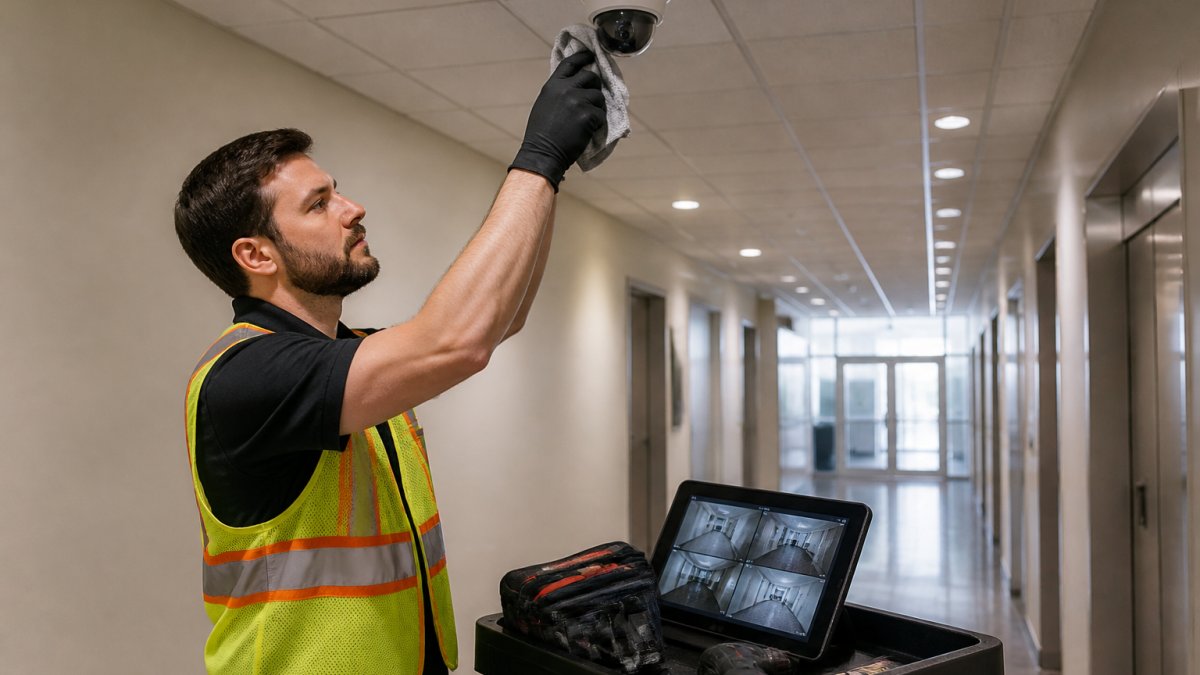
Walk the building and check every camera feed against the real scene. You are looking for four things:
- A live image on every channel, with no frozen frames
- Correct aim, so the field of view covers the door, aisle, or lot you intended
- Accurate timestamps, since a clock that drifts makes footage useless as a record
A common mistake is checking feeds only on the monitor in the office. Open the mobile app too. If the app fails while the local monitor works, you have a network or remote-access problem, not a camera problem.
Lens Cleaning, Image Quality, and Retention Period Checks
Dust, cobwebs, and fingerprint smudges cost you image quality long before a camera dies. Clean lenses with a microfiber cloth and a lens-safe solution, never a paper towel.
Then confirm the recording side:
- Footage plays back from at least three random dates
- The retention period matches your policy and any legal hold requirements
- Storage drives show no warnings or failed sectors
Access Control System Maintenance: Readers, Credentials, and Door Hardware
Access control fails at the door, not in the software. Test every reader with a real credential, then watch what the door actually does.
Run these checks on each controlled door:
- Reader response with a valid card, fob, or mobile credential
- Denial with an expired or unassigned credential
- Request-to-exit devices, including push buttons and motion sensors
Review the credential list quarterly. Former employees and lost fobs are the most common access control gap we find, and removing them is free.
Intrusion Alarms, Sensors, and Entry Point Inspections
Alarm testing is where a written procedure pays for itself. Notify your monitoring center before you start, or you will generate a false alarm and possibly a police response.
Testing Motion Detectors, Glass-Break Detectors, and Door/Window Sensors
Walk-test every sensor and record the result:
- Motion detectors: walk the full coverage pattern, including corners and low approaches
- Glass-break detectors: use the manufacturer's test tool, not a hand clap
- Door and window sensors: open and close each one and confirm the zone reports
A sensor that reports intermittently is failing. Replace it rather than adjusting it a third time.
Alarm Panel, Control Panel, and Communications Checks
Open the alarm panel and control panel and confirm:
- No trouble or tamper conditions on the keypad
- Backup battery holds charge under load
- Cellular communicator has signal and a recent successful test signal
Dual-path communication matters. If your alarm talks to the monitoring center over one route only, a cut line or an internet outage silences the system.
Security System Maintenance Schedule by Frequency
Use this schedule as a starting point, then adjust it to your building, your risk assessment, and any insurance requirements. A single-tenant office and a retail store with a public entrance do not need identical cadence. What separates a usable schedule from a wall chart is that every task has a pass/fail threshold, a named owner, and a deadline for fixing a failure.
| Frequency | Tasks | Pass criteria | Owner |
|---|---|---|---|
| Daily | Spot-check camera feeds, review alarm open/close reports | Every checked channel shows a live image; no unexplained open/close events | Front desk or facilities |
| Weekly audit | Verify recording playback, check door-held alerts, confirm no panel troubles | Playback works from three random dates; no active trouble conditions | Facilities lead |
| Monthly | Clean high-traffic camera lenses, test a sample of readers, check battery status | Image is clear enough to identify a face at the door; sample readers accept valid and reject invalid credentials | Facilities or vendor |
| Quarterly inspection | Full sensor walk-test, all-door access review, credential audit, retention check | Every zone reports on walk-test; no orphaned credentials; retention matches policy | Vendor with facilities |
| Annual | Full system test, backup power load test, firmware and software review, procedure manual update | Backup runtime meets response plan; all firmware current; manual reflects current devices | Vendor and IT |
Pass/Fail Criteria That Make the Schedule Actionable
A schedule without thresholds invites argument about whether a task "passed." Define the numbers up front so a technician can mark pass or fail without judgment calls:
- Camera image quality: a person at the monitored door should be identifiable in the recorded image, not just visible as a shape. If you cannot identify a known staff member from the recording, the camera fails.
- Recording retention: pull footage from the oldest day in your retention window. If it is missing or corrupted, retention fails even if yesterday's footage plays fine.
- Backup runtime: with the load connected, the battery should carry cameras, panels, and network gear for the full duration your response plan assumes. A battery light that reads green is not a pass.
- Sensor response: every zone should report on the first walk-test pass. A sensor that reports on the second or third attempt fails.
Escalation and Remediation Deadlines
Tie each failure to a severity and a deadline so nothing sits in a queue:
- Critical (no video on a monitored entrance, alarm cannot communicate, mag lock will not release): remediate same day, retest and sign off before close of business.
- High (one camera down in a multi-camera view, intermittent sensor, backup battery below threshold): remediate within 72 hours.
- Routine (dirty lens, drifted timestamp, cosmetic hardware wear): remediate at the next scheduled monthly visit.
Every failure gets a work order number, a named owner, and a retest date. The retest is what closes the item, not the repair itself.
Two habits separate well-run buildings from the rest. First, the weekly audit gets logged even when nothing is wrong. Second, quarterly inspections are done with the vendor present, not handed off.
Frequency beats intensity. A short weekly audit catches more real failures than one long annual inspection, because most problems show up as small changes over time. Pair the cadence with pass/fail thresholds and remediation deadlines, and the schedule becomes an operational tool instead of a reminder.
Security System Maintenance Log Template and Recordkeeping
A maintenance log turns inspections into evidence. Insurers, auditors, and your own team all ask the same question: how do you know the system works?
Record these fields for every task:
- Date, time, and technician name
- System and device identifier, such as camera 14 or door 3
- Test performed and the result, pass or fail
- Corrective action taken, with a work order number
Keep records for at least the period your insurer or legal counsel specifies, and store them somewhere the facilities team can reach without asking IT.
Ownership needs a name, not a department. Assign one person who signs off on the schedule and one escalation path for after-hours failures.
Cybersecurity, Backup Power, and Safe Testing Procedures
Every connected device is a small computer, and it needs the same care. The difference between a security system that resists an incident and one that becomes the incident is usually a handful of device-level controls that facilities teams can check themselves.
Device-Level Cybersecurity Checks
Run these against cameras, access control panels, intercoms, and the alarm communicator:
- Default credentials: confirm no device still uses a factory username and password. Change them at installation and again whenever a technician who had access leaves.
- Firmware currency: record the firmware version on each device and compare it to the manufacturer's current release. Cameras and door controllers are frequently the oldest unpatched devices on a commercial network.
- Account access: review who can log into the video management system, access control software, and alarm panel. Remove accounts for departed staff and contractors, and require unique logins rather than a shared admin account.
- Network segmentation: put cameras and access control on their own VLAN or physical network segment, separate from point-of-sale, guest Wi-Fi, and office computers. A camera compromised on a flat network is a path into everything else.
The Cybersecurity and Infrastructure Security Agency guidance on securing connected devices is a practical starting point for small facilities teams that need a baseline without a dedicated security staff.
Backup Power Testing That Actually Proves Runtime
Backup power deserves a real test, not a glance at the battery light. A battery can show a healthy charge and still collapse under load.
- Identify the load: list every device the backup is supposed to carry, including cameras, the network switch, the alarm panel, and the access control controller.
- Simulate an outage: with the vendor present, disconnect primary power and time how long the connected load runs.
- Compare to plan: the measured runtime should meet or exceed the duration your response plan assumes. If it does not, the battery or the load needs attention.
- Record the result: log the measured runtime, the date, and the battery age. Batteries degrade, so a passing result this year is not a passing result next year.
Safe Testing Procedures
Safe testing follows three rules:
- Notify the monitoring center and staff before any alarm test, and confirm the account is on test so a false alarm does not generate a police response.
- Test one zone at a time so a failure is easy to isolate and a technician is not chasing two variables at once.
- Document the result before moving on, including the device identifier, the test performed, and the pass or fail outcome.
For code-related questions on alarm and life-safety systems, check the National Fire Protection Association standards and your local authority having jurisdiction. Requirements vary by building type and occupancy, and a maintenance schedule should be reviewed against those requirements rather than assumed to satisfy them.
Frequently Asked Questions
What should be included in a commercial security system maintenance checklist?
A complete checklist covers cameras, recorders, access control, intrusion alarms, and network devices. For cameras, verify live feeds, clean lenses, and confirm retention periods. For access control, test readers, credentials, and door hardware. For alarms, check panels, sensors, and communication paths. Also include backup power checks, firmware updates, and a signed log entry for every task. The checklist should list pass/fail criteria so technicians can record results consistently.
How often should a commercial security system be inspected?
Most commercial systems need a weekly visual check, a monthly functional test of critical devices, and a quarterly deep inspection. High-risk sites may require monthly full inspections. Use a security system maintenance schedule that assigns tasks by frequency: weekly for camera feeds and door contacts, monthly for alarm panel tests, quarterly for access control and network reviews, and annually for full system audits. Document each inspection in your maintenance log.
Can businesses perform security system maintenance themselves?
Staff can handle basic checks like cleaning camera lenses, verifying live feeds, and visual inspections of door and window sensors. Functional testing and repairs often require specialized training and insurance. Keep a security system maintenance log template to track who performed each task.
What records should be kept after a security system inspection?
Keep a dated inspection record for every device, including pass/fail results, corrective actions taken, and the technician's name. Store camera retention logs, access control audit trails, and alarm test results for at least one year. A security system maintenance log template should capture device ID, location, test performed, outcome, and follow-up date. These records support insurance claims, compliance audits, and warranty claims, and they help you spot recurring failures.
- Hits: 10